2 Module Suite
The COVISA module suite is a set of modules that extends IRIS Explorer for collaborative working. The modules function in just the same way as all other IRIS Explorer modules, being launched from the Librarian and connected into maps. This system gives the advantages of collaborative visualization without re-learning the visualization. Described are the components of the COVISA collaborative system and additional example collaborative modules.
2.1 COVISA Server
This part of the COVISA collaborative system is responsible for:
-
coordinating the joining and leaving of participants;
-
the connection and launching of collaboratively aware modules;
-
routing data between group members.
-
The default mode of operation is referred to as ‘Store and Forward’. In this mode, a copy of the last data object for each group is kept as it is passed through the server. When collaborators join late or make a module reconnect (after being disconnected), they are automatically given a copy of the current shared object for each group. This mode can be started up by typing the command
COVISAServer
in a shell window. -
The second mode of operation is referred to as ‘Pass’. In this mode data is simply distributed to collaborators as it is received, no copy being held at the server. This mode is more efficient if large amounts of data is being held, and suits certain styles of conferencing. When a collaborator joins late, one of the current collaborators must cause their sharing modules to fire so that the latecomer receives the current data set. This mode is accessed by typing the command
COVISAServer -nsaf
in a shell window.
Help is available by typing
COVISAServer -help
in a shell window.
The COVISA Server uses the COVISA_CENTRAL_PORT environment variable to set the port number it will use (see Q.1).
2.2 MServer Before Connection
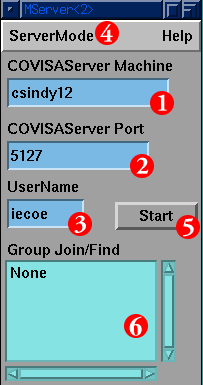
This is the MServer module which is used to make a connection to the COVISA Server, and hence join the collaborative session. The widgets that can be seen are as follows:
-
The name of the machine where the COVISA Server is running. This is pre-set by the IRIS Explorer system (using the COVISA_CENTRAL_MACHINE environment variable (see Q.1).
-
The port number used by the COVISA Server. This is pre-set by the IRIS Explorer system (using the COVISA_CENTRAL_PORT environment variable (see Q.1).
-
When collaborators join a session, their name appears in the Conference List text slot. This name comes from the UserName widget, which is pre-set using the USERNAME environment variable.
-
This menu is used to toggle the MServer module's connection mode between On-The-Fly mode (see Chapter 4, "On-The-Fly Collaboration") where collaborative maps are dynamically created by the collaborators, or Application mode (see Chapter 5, "End User Applications") where previously constructed maps are used with IRIS Explorer in application mode. The menu is only visible on the maximised control panel.
-
Once information has been entered in 1, 2 and 3 above, the Start button is used to make the module attempt to connect. If connection is successful, then the module control panel's appearance changes to that of Figure 2-2.
-
When the user is connected to a collaborative session this list box contains the names of all the currently shared modules within the session. Before any connection is made there are no shared objects.
2.3 MServer After Connection
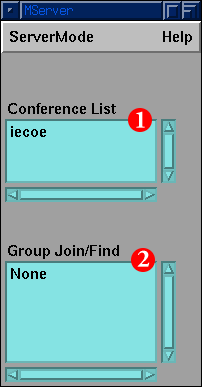
After connection to the session, the MServer module changes appearance to show the following information:
-
The Group Join/Find List widget appears with the list of all currently shared modules. It is currently empty indicating no modules are being shared. When a collaborative module is launched and initiated with the session its Group Number and module type appear in the list. The format used is the Group Number followed by the module type e.g. ‘3 MShareParam’. Clicking on groups in this widget causes one of three actions depending on the current state of that module within the user's environment:
-
if the user has a member of that group, and it is connected, then its control panel is maximised; this is called the find action.
-
if the user has a member of that group, but it is currently disconnected, then the module is reconnected; this is part of the join action.
-
if, for some reason, the user does not have a member of that group, then an appropriate module is launched and connected to the session. This is also the join action.
-
Connection of other COVISA modules can only occur after the successful connection of the MServer module.
2.4 MShare Modules Before Connection
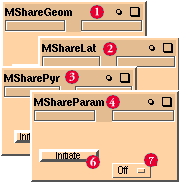
These are the basic data sharing modules, one for each of the principal internal datatypes of IRIS Explorer.
-
MShareGeom – to share the geometry datatype.
-
MShareLat – to share the lattice datatype.
-
MSharePyr – to share the pyramid datatype.
-
MShareParam – to share the parameter datatype (used by control panel widgets), and hence the control of modules.
-
MSharePick – to share the Pick datatype (new at release 5.0 and not shown in the picture).
This is how the modules look before connection, with only the Initiate button (6) and the Pass Through menu (7) visible. Pressing the Initiate button makes them connect to the COVISA Server. Setting the Pass Through widget to On means that data received on the module's input port is not only passed into the session, but also passes out of the output port of the module. When set to Off, the data is only passed into the session (assuming the module is connected).
2.5 MShare Modules After Connection
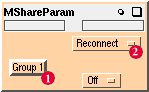
Once the modules have connected, then their control panels change to show the following information:
-
The Reconnect/Disconnect toggle allows individual modules to be disconnected from the collaborative session to allow periods of private work.
2.6 MAdvisor
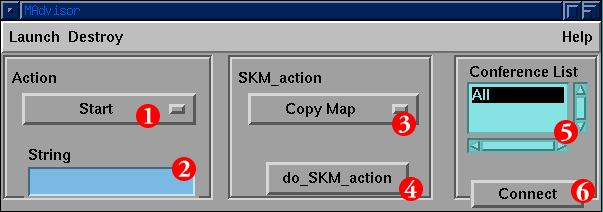
The MAdvisor module (see Figure 2-5) should be launched once the MServer module has connected to the collaborative session. It is used to:
-
aid collaborative map building
-
aid collaborators who may be less experienced IRIS Explorer users
-
help late joiners to a session catch up by sending them the current state of the map
It uses Skm (IRIS Explorer's scripting language) to construct map elements in the Map Editor of other collaborators. It can do as little as launch a named module, or as much as construct an exact copy of an entire map. The labeled buttons perform the following functions:
-
The Skm function to be applied using the text in the typein (2).
-
The text required to fulfil the Skm command as chosen by the menu (1). For example, the Skm command start just needs the name of a module entered into the typein box.
-
The Skm action to apply to the (set of) module(s) highlighted in the Map Editor. This can be to copy the entire map, overlay the parameters of the highlighted module(s) onto their counterparts in the other Map Editors, etc.
-
Pressing this button applies the Skm action chosen by the menu (3) to the currently highlighted (set of) module(s).
-
This is a list of usernames of all the current collaborators in the session (except yourself). In addition it has the default option of All. Selecting a username from this list enables the targeting of the generated Skm commands.
-
This button is used to connect the module to the collaborative session and is only visible while the module is unconnected. Since the module connects automatically after launch this button is generally not visible.
2.7 Additional Modules
In addition to the basic data sharing and collaboration control modules, some example collaborative modules (including source code) are also available in this release.
2.7.1 MSharePointer
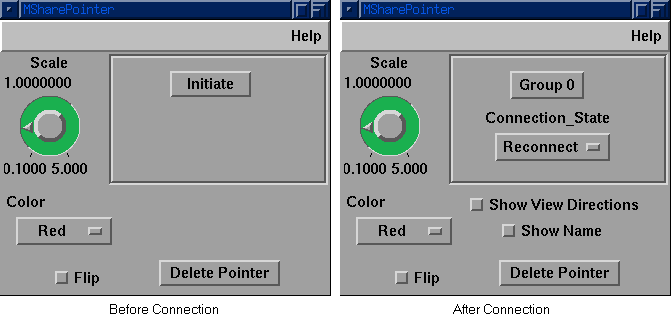
This module is an extension of the collaborative pointer module in release 4.0. It can operate in single user mode giving a functionality similar to that of the original module, but the geometric output has changed and up to five color coded pointers may now be generated from a single module. In addition, pointer geometries may be deleted from the scene, and the active pointer can be selected either by using the Color menu widget, or clicking on the required pointer in the scene.
MSharePointer can also be used in collaborative mode and offers all of the single user functionality as well as some collaborative extensions. The picture above shows two views, before and after connection. Connection to the collaborative session is achieved in the same way as for the other COVISA modules, simply pressing the Initiate button. After connection, the standard Group Number and Connection State widgets appear, as well as the new Show Name and Show View Directions widgets. Selecting Show Name puts the usernames, chosen when users connected to the collaborative session, as text in the Render window next to the pointer geometries that they created. Selecting Show View Directions is used to turn on lines that show the viewing direction of collaborators at the moment when they generated a pointer geometry. For each of the pointer geometries, this viewing direction is represented as a line that joins the pointer geometry to the position in 3D space at which the collaborator's camera had been placed when the pointer geometry was made. This feature requires that the camera output from the collaborator's Render module be connected to the MSharePointer module of the collaborator at the time the pointer geometry was made.
In collaborative mode, Pick events are shared between connected instances of this module with the resulting geometric output being displayed in the Render windows in all connected sessions. Assuming all collaborators have the same object visible in their Render modules, then the generated pointer objects will highlight the same visualization objects in all scenes. Having a number of pointers available enables easy comparison of multiple points in the scene.
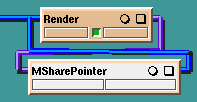
The MSharePointer module is wired in a loop with the Render module (see Figure 2-7. The output from Render's Pick port is wired into the input port on MSharePointer. The output Pointer geometry port of MSharePointer is wired into Render's Input port. For more information on wiring up collaborative modules see Section 4.3.
You can control the size and colour of your pointer, so as to distinguish it from pointers generated by other collaborators in the session. To generate Pick events, Render must be set into the appropriate mode, see Section 2.7.1.1.
2.7.1.1 Setting the Render Module into an Appropriate Mode for Use with MSharePointer
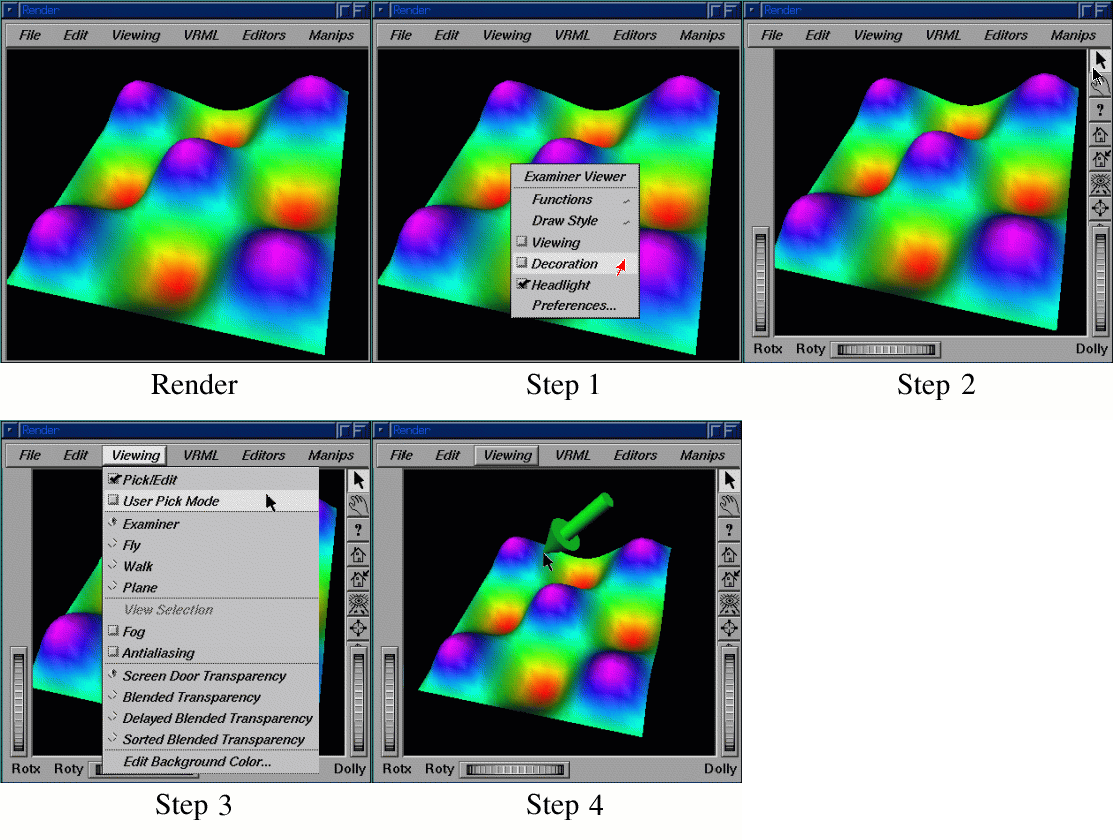
After wiring the modules together as described previously, there are four steps involved in creating a Pointer in a scene:
-
Right click in the Render window and select Decoration in the popup menu. This will give you the border shown in Step 2 of Figure 2-8.
-
Select the mouse pointer shaped button at the top right of the new border in the Render window.
-
Select User Pick Mode from the View pulldown menu.
-
Click at the desired location on an object in the scene to attach your pointer at that point.
2.7.2 MShareGraph3D
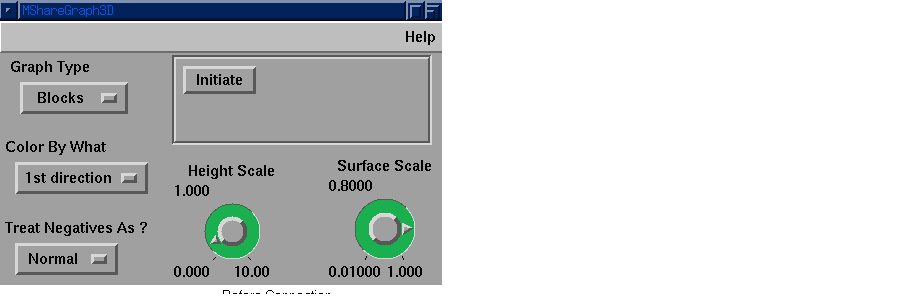
This example module is an extension to the original Graph3D module. It can be used in single user mode in the same way as the original. Once connected to a collaborative session, using the Initiate button, it can be used collaboratively. This module demonstrates how collaboration can be achieved with a different mechanism to that used by MSharePointer. Rather than sharing the internally generated Geometry, it allows shared control of the module's control panel widgets. When one collaborator changes the value of any of the widgets, this change is passed to the MShareGraph3D modules of all the other collaborators. When using the COVISA Server in its store and foreward mode, the current control widget values are automatically sent to a collaborator who joins late. If the session is using the COVISA Server in pass mode, then the Sync Values button (only visible after connection) can be used to pass the current control widget values to all collaborators to ensure that the values are the same. The data for this module can be shared using an MShareLat module to share the input lattice data. For more information on sharing data in a collaborative session, see Section 4.4
2.7.3 MShareLatToGeom
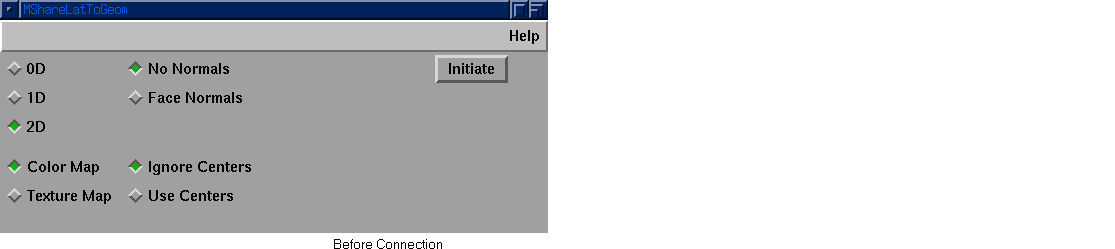
This last example is again an extension of an existing module that can be used in either single user or collaborative mode. The module is connected to a session in the same way as any other collaborative module, by pressing the Initiate button. This module implements collaboration differently to both of the two previously described modules. It effectively combines LatToGeom with an MShareLat module. The user can select either a local data source or a remote data source using the Data_Source widget which becomes visible after connection. If a local data source is selected then the module uses the data wired in from its own map, also sending a copy of that data into the collaborative session when it first arrives. If a remote data source is selected, then the module uses the data coming in from the collaborative session. The control panel widgets of each module are completely independent, but can be shared using an MShareParam module. For more information on sharing parameters in a collaborative session, see Section 4.3.